Introduction
I’ve been using Claude Code since its release — every day, on real tasks. I’ve gone from being a skeptic (“just another hype tool”) to a fanatic (“the agent will do everything itself”). Eventually, I arrived at a set of rules that help avoid extremes.
For me, Claude Code is the best agent on the market. I tried Cursor, Gemini CLI, Codex, but the difference is palpable. Anthropic really invests in the product and regularly adds features.
This article is for those starting to work with Claude Code. Experienced users will find much familiar, but something will surely resonate. Two parts: how not to clog the context and how to change your approach depending on the task.
Watch out for context window dilution
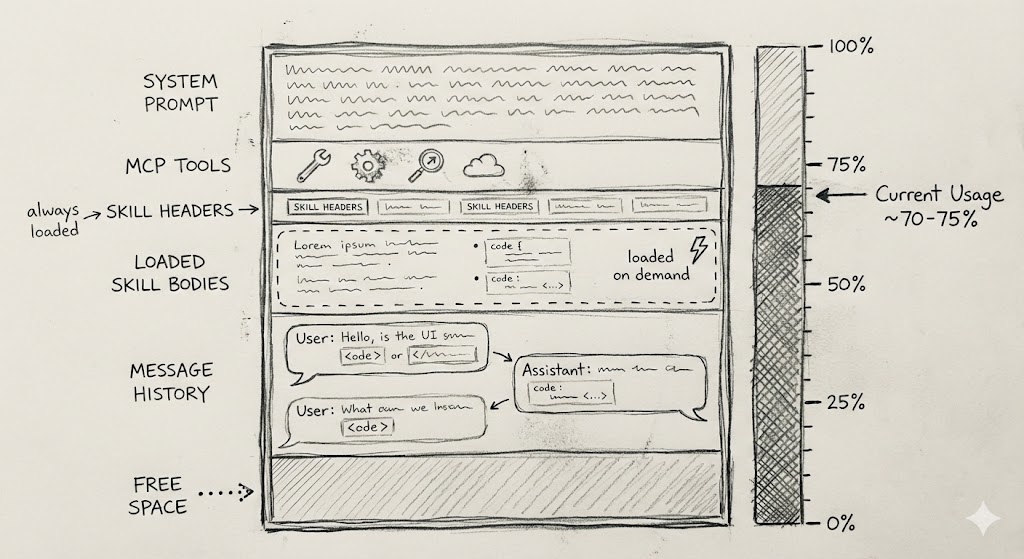
The context window is the main parameter affecting the agent’s “intelligence”. The more information is in it, the more the quality of answers degrades: the agent starts missing important details. Therefore, it is critical to keep only information relevant to the task in the context.
Aggressively use /clear
I use /clear every time I finish working on a subtask — even if the next one is related to the previous one. Yes, previous context might help the agent in the next step. However, it is better to estimate intuitively what part of the remaining information is truly useful. If it’s less than 50%, it’s better to clear the window and let the agent gather the necessary data again.
Don’t overload the agent with MCP servers
MCP Tools get into the prompt with every request — the agent needs their descriptions to decide which tool to call. The problem is that this greatly bloats the context: a couple of MCP servers can eat up 50% of the window even before you write the first request. At the same time, most tools you probably won’t use at all.
What to do:
- Disable unnecessary MCP servers. If you create a Jira task once a month and
createIssueis the only tool you use, it’s better to disable this server. Create tasks manually or set up a separate agent in Claude Desktop. - Limit the list of tools. Some MCP servers allow specifying which tools to connect. If your server supports this — go through the list and leave only the necessary ones.
Unfortunately, Claude Code currently has no built-in way to filter tools — everything depends on support from the specific MCP server. Many servers do not provide this capability yet.
Another limitation: you cannot connect MCP tools only to a sub-agent, leaving the main agent “clean”.
Use Skills
Skills are “lazy” instructions. They are loaded into the prompt only when needed.
Sooner or later you will encounter a situation: the agent solves a task not as is customary in your project. Writes migrations without IF NOT EXISTS, creates endpoints in a different format, uses the wrong logging style.
The first thought is to add rules to CLAUDE.md:
When you write database migrations always use IF NOT EXISTS
instruction for columns, tables, etc.
This works, but over time CLAUDE.md grows. Instructions on migrations, API, tests, code style — everything in one file. As a result, the system prompt takes up 30% of the context, and for the current task, only 10% is relevant. Why load migration rules if you are writing a unit test?
Skills solve this problem. A skill consists of a header (when to activate) and a body (the instructions themselves). The agent only sees the headers, and loads the body as needed. Received a migration task — skill activated — instructions in context. Writing a test — the migration skill is not touched.
Note: As of November 2025, skills are unstable. The agent often does not activate a skill, even if the task fits the description perfectly — this is a known problem that many complain about.
The Claude Code team is experimenting with solutions: hooks, manual classification. Some colleagues are reinventing the mechanism altogether — putting instructions in a separate folder and writing in CLAUDE.md when to read which file. Surprisingly, it works better.
I’m not bothering with customisation yet — waiting for a fix from Anthropic, the problem is too noticeable to ignore. Meanwhile, I invest in precise skill headers to increase the chance of activation.
Use Sub agents
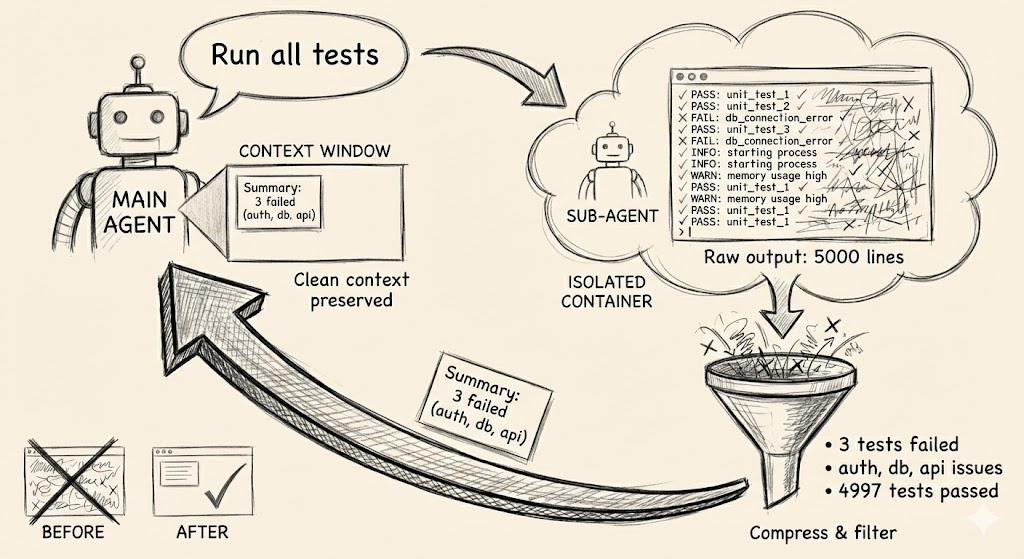
Sub agents also help with context, but protect against something else — garbage in command and tool output.
A classic example is running tests. The output of go test ./... contains a heap of information that the agent doesn’t need. Why does it need to know about 200 successful tests? Only the failed ones matter.
The solution is to create a sub-agent via the /agents command. It receives a task from the main agent, runs tests in its own context window, and returns only the essence: which tests failed and why. The main agent receives a clean, compressed result instead of a sheet of logs.
Adapt your approach based on the task
In production, the approach differs from vibe-coding, where you can ignore the code and only watch the result.
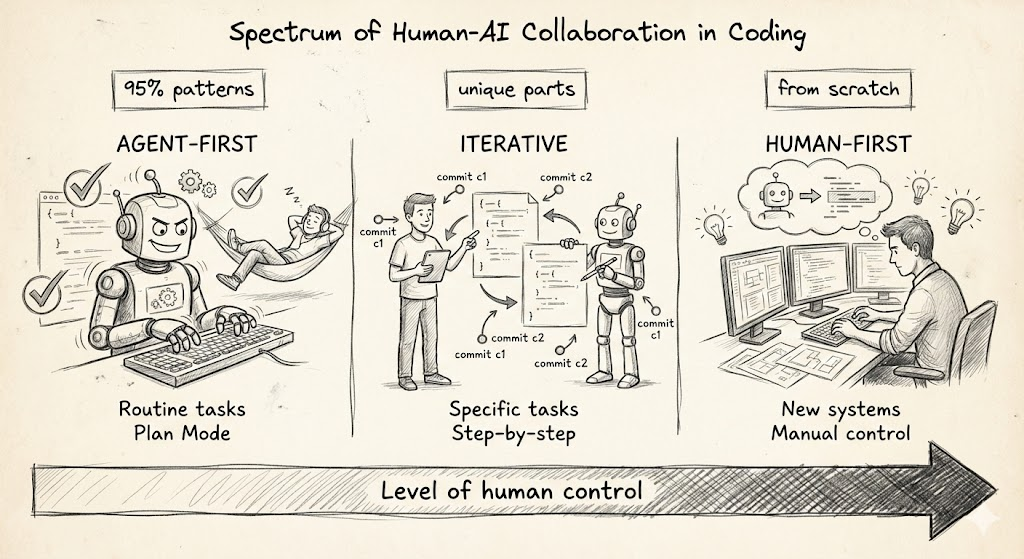
I divide tasks into three types:
- Typical — 95% consist of patterns already present in the codebase
- Specific — there are unique parts requiring special attention
- Absolutely new — need to develop an important subsystem from scratch
Plan mode for agent-first tasks
I give typical tasks to the agent entirely — let it solve e2e, I only review the result.
Plan Mode is convenient here. You describe the task at a high level, the agent builds a plan, you adjust it and start execution. Usually, I change the plan 1–3 times, pressing “Keep planning” and clarifying details until the plan is completely satisfactory.
Iterative approach for human-first tasks
I break specific tasks into stages. I give the agent a small chunk, check the result, make edits, commit, and move to the next. More control, more quality, but also more involvement — you lead the process, the agent helps.
Important: secure successful steps via git commit. The agent often starts well but ends poorly — and then uncommitted changes turn out to be mixed up, making rollback painful.
Note: Claude Code has a
/rewindcommand to rollback unsuccessful iterations. I almost don’t use it (probably in vain) and rely on git. If you have experience with/rewind— write in the comments how reliably it works.
I almost don’t use Plan Mode here — tasks are smaller, it’s easier to check the result via git diff and adjust code, not the plan.
Don’t use Claude Code for absolutely new tasks
For the third type of tasks, I refuse Claude Code altogether. I use a regular LLM for questions, snippets, and hints, but I do all the development myself.
Why? When you write a new subsystem from scratch, it is important to control every aspect. Do not let the LLM introduce its approaches. In prototypes — please, let the agent create. But in production code, I want to know exactly how everything is organised and be sure of every line.
Conclusion
Two main principles:
Keep the context clean. Aggressively use /clear, disable unnecessary MCP servers, move instructions to skills, and noisy output to sub-agents. The less garbage in the context, the smarter the agent.
Match the level of control to the task. Give typical tasks to the agent entirely via Plan Mode. Break specific ones into stages and commit every successful step. Write absolutely new subsystems yourself, using LLM only for hints.
Claude Code is a powerful tool, but not a magic wand. The result depends on how consciously you use it.